
Facing Frequent Downtime in Manufacturing? Here is How Power Automate Helps
Your production line rarely stops because nobody knew there was a problem. In most cases, it is because someone noticed the problem too late. A machine starts to malfunction. An operator informed the supervisor. The supervisor called maintenance. Someone checked the equipment. A work order was eventually created. A spare part had to be located. And by the time the right technician arrived, the line had already been down for an hour. Frequent Downtime in Manufacturing is often caused by such delays and communication gaps.
This is a very common scenario which causes downtime in manufacturing, irrespective of the nature of the operation. In this article, we will look at how we, at Evolvous, can use Power Automate to solve manufacturing downtime.
What is Microsoft Power Automate?
Microsoft Power Automate is a low-code cloud service that automates repetitive workflows across apps and desktop interfaces, connecting triggers and actions to streamline tasks, data transfers, and approvals effortlessly.
Discover More About Microsoft Power Automate
Know more about the platform, its capabilities and how we at Evolvous can help you leverage it to solve your everyday challenges.
How Does Power Automate Solve Your Manufacturing Downtime?
When we setup Power Automate for manufacturing, we connect your production, maintenance, ERP, collaboration, and notification systems.
Now for you as a manufacturer, this means that Power Automate manufacturing RPA flows can be leveraged in several ways:
- It Can Automatically Escalate Machine Breakdowns
Let us suppose your operator records a machine breakdown in a production system or maintenance application. If you have Power Automate, then you do not need to manually call maintenance. With Power Automate workflows, you can automate the entire process.
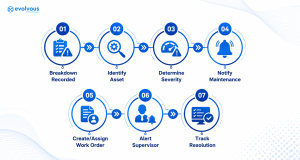
For example, a critical CNC machine could trigger an immediate Teams notification to the maintenance supervisor, while a lower-priority issue could enter the normal maintenance queue.
- Turn maintenance requests into work orders automatically
For over the past decade, we have worked with manufacturers across Canada, the US and around the world. We have seen many factories still relying on emails, spreadsheets, paper forms, or messages from operators to initiate maintenance.
This is tedious and time consuming, which leads to the downtime getting bigger, not smaller.
At Evolvous, we can help you build a Power Automate flow that takes a maintenance request and automatically executes tasks like:
- Validate the equipment and issue
- Create a maintenance/work-order record
- Assign priority based on predefined rules
- Route the request to the appropriate technician or team
- Send confirmation to the person who reported it
- Start an SLA or response timer
- Escalate overdue requests
- Check Spare Parts Availability Automatically
A machine may be diagnosed in five minutes and remain down for five hours because the required component is unavailable. Sounds familiar, right?
Also read: – Dynamics 365 Consulting Services for Food Manufacturers
We can use Power Automate to connect the maintenance process with your inventory or ERP environment.
When a technician identifies a required part, the Power Automate RPA workflow can check availability and then run the following flow:
Part is available – > request part -> notify technician
In case the part is unavailable, it can run the following flow:
Part unavailable -> identify purchasing action -> notify procurement -> escalate critical shortage
As a result, you can quickly check which spare parts are available and then take the appropriate steps.
- Automate Preventive Maintenance Reminders
As a professional manufacturing company, you want preventive maintenance to happen before equipment failure, not after it.
But when your maintenance schedules frequently live in spreadsheets, calendars, or systems that aren’t actively monitored by the people responsible for execution.
When you use Power Automate RPA to solve manufacturing downtime, you can monitor upcoming maintenance events and automatically:
- Notify the maintenance team
- Create maintenance tasks
- Notify production planning
- Request required parts
- Escalate overdue maintenance
- Record completion
- Trigger the next maintenance cycle
This effectively creates a closed-loop process rather than a simple reminder. A simple automated reminder says will just say maintenance is due.
But an automated workflow will say,
“Maintenance is due, the technician has been assigned, the parts are available, production has been notified, and the task will be escalated if it isn’t completed.”
Check: – Dynamics 365 Consulting Services for Industrial Equipment Manufacturers
Download FREE Whitepaper on Manufacturing Industry Solutions
Power Automate RPA is just one of the ways in which we can solve critical manufacturing challenges. Download the FREE whitepaper to learn more.
How Evolvous Helps You to Solve Manufacturing Downtime with Power Automate?
Let us now look at how we set up Power Automate to solve manufacturing downtime within your existing infrastructure. Unlike certain other manufacturing IT consultants, we don’t start by asking, “Which Power Automate flow should we build?”
We start with by asking “Where exactly is downtime being created?”
Here is how we can help you build a Power Automate RPA system for manufacturing:
Stage 1: Map the downtime workflow
We identify what happens from the moment an issue is detected until the machine returns to production. We will start by documenting:
- Detection
- Reporting
- Diagnosis
- Work-order creation
- Technician assignment
- Parts availability
- Repair
- Testing
- Production restart
- Closure
We then identify manual handoffs and delays.
Stage 2: Connect the systems
Next, we identify where the required data is stored. That could include but is not limited to Dynamics 365/SAP/Oracle ERP and CRM, Microsoft Dataverse, SQL Server, SharePoint, Microsoft Teams, Power Apps and beyond.
The connector architecture of Power Automate allows workflows to work across multiple business systems rather than creating another isolated application.
Stage 3: Build the automation logic
After that, we translate the business rules into flows.
For example:
IF machine = critical asset
AND downtime reason = unplanned breakdown
THEN create priority work order + notify maintenance manager + notify production supervisor.
Or, in other cases:
IF required spare part is unavailable
THEN create procurement request + notify buyer + escalate if machine downtime exceeds defined threshold.
Our objective isn’t to automate everything. We will be focused on automating the decisions and handoffs that repeatedly slow your maintenance team down and causes downtime.
Stage 4: Add visibility
Next, we need to ensure that the key decision makers and executives can always monitor the system. We can connect the workflow data to Power BI so operations teams can analyze metrics such as downtime by machine, maintenance response time, recurring failure patterns, work-center utilization, and maintenance cost.
At this stage, we recommend that you integrate Power Automate with Power BI. This gives you real-time visibility into areas such as work-center load, capacity, production times, scrap, production orders, and capacity variance.
What does this mean? Well, you will be moving beyond from simple observations like:
“Machine 14 keeps breaking down.”
And more towards actionable insights like:
“Machine 14 accounts for 31% of unplanned downtime, average response time is 18 minutes, and the same failure category has occurred six times this quarter.”
Stage 5: Test, govern, and scale
Finally, our team will rigorously test the workflows against real manufacturing scenarios.
Working with your team, we will establish permissions, error handling, retry logic, escalation rules, monitoring, and governance before moving the automation into production.
Then we can expand the framework from one machine or production line to multiple assets, facilities, and business processes.
Start with Your Manufacturing RPA Assessment
So, how can Power Automate RPA solutions for manufacturing solve your exact challenges? Get our Assessment to explore options and take the right step forward.
Frequently Asked Questions
1. Can Power Automate prevent machine breakdowns?
Power Automate itself does not predict mechanical failure. However, when connected to IoT, analytics, or predictive-maintenance systems, it can automate the response to abnormal equipment conditions and maintenance predictions.
2. Can Power Automate integrate with ERP?
Yes. Microsoft provides Power Platform capabilities and connectors for integrating with SAP, Dynamics 365, Oracle and most other popular ERP systems out there. This allows you to build workflows and applications around ERP data and processes.
3. Can Evolvous automate our existing maintenance process?
Yes, absolutely! Rather than requiring you to replace your existing systems, Evolvous can assess your current ERP, maintenance, production, collaboration, and data environment and determine where Power Automate can connect and automate the existing process.
4. Which process should I automate first?
We recommend that you start with the downtime workflow that has the highest combination of frequency, business impact, and manual intervention. During our discovery call, we will assess and identify the right processes to begin with.


