
How to Build a Customer Self-Service Portal with Power Apps?
Are you constantly getting complaints about how slow customer service is in your business? Modern customers want answers without waiting. Whether it’s checking an order status, submitting a support request, downloading invoices, or updating account information, today’s customers expect instant access. Long email chains and overloaded support teams simply don’t fit modern businesses. This is why it is crucial to have a customer self-service portal. In this article, we will learn how to build a customer self-service portal with Power Apps.
A Power Apps customer portal can connect directly to Dynamics 365, SharePoint, Dataverse, SQL Server, and hundreds of other systems. And the best part is, you don’t need to rely on extensive coding expertise to build and maintain it.
So, what is the result? If done right, you get faster customer service, lower support costs, and better customer experience.
Let us find out how to do it right.
What Is a Customer Self-Service Portal?
A customer self-service portal is a secure web application where customers can independently access information and complete common tasks without contacting your support team.
A Power Apps service portal can allow your customers to:
- View orders and invoices
- Submit support tickets
- Track service requests
- Update profile information
- Download documents
- View knowledge base articles
- Schedule appointments
- Complete forms
- Upload files securely
- Communicate with support agents
Since Power Apps integrates natively with Microsoft 365 ecosystem, all your customer interactions remain synchronized with your existing systems.
Also check: – AI Automation for Small Businesses
Why Should You Choose Microsoft Power Apps?
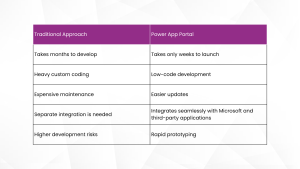
Unlike traditional app development, the low-code/no-code app development capabilities of Power Apps significantly reduce both development time and maintenance costs.
Traditional Approach vs Power Apps: Which is Ideal for Customer Portal Development?
Discover More About Microsoft Power Apps
Explore the capabilities of Power Apps and how we help you leverage its full potential.
What are the Things You Need for Power Apps Customer Portal Development?
When it comes to Power Apps customer portal development, one of the first things that you will need is to understand the things you will need. At Evolvous, we generally combine several Microsoft technologies for optimum efficiency and a seamless customer experience.
This acts as the secure data layer where all your customer information, requests, and records are stored.
This low-code process automation tool can be used to automate repetitive tasks such as ticket routing, email notifications, approval workflows and others
Integrating with D365 allows your customers to view real-time information directly from different modules like Customer Service, Sales, Business Central, Field Service, Finance.
Microsoft Entra ID Authentication
Entra ID ensures secure customer login with support for Microsoft accounts, Google, LinkedIn, Azure B2C, multi-factor authentication.
Learn More About the Licensing Requirements
If you are on E3 or E5, then you might need better licensing planning for cost optimization. Contact us to learn more.
How to Build a Customer Self-Service Portal with Power Apps – the Process
At Evolvous, we have helped a number of businesses from different verticals. For a successful implementation, our team of certified Power Apps consultants follow a structured approach rather than jumping straight into development.
Here is the step-by-step process that we follow:
STEP 1: Define Customer Journeys
We start the process by identifying every interaction your customer currently performs manually. These might include but are not limited to:
- Checking order status
- Requesting support
- Viewing invoices
- Updating account details
- Downloading documentation
Once we have identified them, we will prioritize high-volume tasks that consume maximum support resources.
STEP 2: Design the Information Architecture
Next, we will begin working on the foundations. We will organize portal content into logical sections. For example, we can build a navigation scheme, that includes
- Dashboard
- Orders
- Support
- Knowledge Base
- Documents
- Profile
- Contact Info
It is important that we work on having a clean navigation structure, as that significantly improves customer adoption.
STEP 3: Ensure Secure Data Access
By leveraging Microsoft Dataverse and security roles, we will work together with your team to define exactly what your customers can view or edit. For example:
- Customers only see their own orders
- Vendors see purchase information
- Partners access shared documentation
- Internal users receive administrative access
We aim to ensure a completely secure system that can be managed without complex custom development.
STEP 4: Build Portal Screens
Next, we will start the work on creating responsive pages that include:
- Forms
- Lists
- Dashboards
- Search functionality
- File uploads
- Embedded reports
- Interactive charts
Because Power Apps is low code, we can add new pages quickly as your business requirements evolve.
Download the FREE eBook on Power Apps
Learn more about the platform, its capabilities, and what makes it the right fit for your business.
STEP 5: Integrate With Your Existing Business Systems
Critical data, which might be used by the portal, is often stored on other applications. This is why at this stage we will integrate the Power Apps customer service portal with your existing systems.
Your Power Apps customer self-service portal Power Apps connects with:
- Dynamics 365
- Business Central
- SharePoint
- Microsoft Teams
- Azure API
- Other third-party software
STEP 6: Automate Business Processes
It is commonly known that manual processes create delays. Therefore, by using Power Automate, we can automate the way you:
- Assign support tickets
- Notify account managers
- Generate approvals
- Send confirmation emails
- Create CRM records
- Trigger service requests
STEP 7: Pre-Launch Testing
Before deployment, we run the system through multiple rounds of tests. During these test, we validate:
- User permissions
- Mobile responsiveness
- Form validation
- Workflow execution
- Performance
- Security
- Browser compatibility
We also conduct rigorous rounds of User acceptance testing (UAT) as that helps uncover issues before customers experience them.
STEP 8: Deploy and Monitor
Once the system is tested, we will deploy it on the live environment, where your customers can easily use it. Just after deployment, we will track metrics such as:
- Portal usage
- Ticket reduction
- Customer satisfaction
- Search success rate
- Login frequency
- Response times
Check Case Study for: – SharePoint Intranet Migration and Customization
Get a Customized Roadmap to Build Power Apps Customer Service Portal
Connect with our team today and get a customized roadmap to build your own low-code Power Apps service portal.
What are the Common Features You Can Include?
There is practically no limit on the features that you can add to your customer portal. Most customer portals that we build include a combination of the following capabilities:
- Secure login
- Personalized dashboards
- Knowledge base search
- Case management
- Invoice downloads
- Online payments
- Appointment scheduling
- Live chat integration
- File uploads
- Notifications
- Mobile-friendly experience
Where can AI Add Value to Your Power Apps Portal?
You can include Microsoft Copilot to customer self-service. By using Microsoft Copilot Studio, we can help you build an AI assistant that make it easy to:
- Answer frequently asked questions
- Find documents instantly
- Recommend knowledge articles
- Summarizing previous support cases
- Draft responses
- Guide users through forms
- Automatically route complex requests to the right team
Read: – Dynamics 365 Customer Service benefits and features
Discover More About the Potential of AI for Your Business
Explore our AI and machine learning solutions and find out how they can help you cater to your customers in a better way.
How Long Does It Take to Build the Customer Self-Service Portal?
The timeline depends on the number and extent of integration, customization, and security requirements. Projects involving ERP integration, multiple business systems, or complex workflows typically require additional planning and testing, and that adds to the time.
Here is an estimate of the timelines that you can expect:
| Project Size | Estimated Timeline |
| Basic portal (<20 employees) | 3 to 5 weeks |
| Standard portal ( 20-100 employees) | 6 to 10 weeks |
| Enterprise implementation (>100 employees) | 10 to 16 weeks |
What are the Common Challenges and How Do We Avoid Them?
Here are some of the common challenges that you might face with your Power Apps customer portal and how we effectively solve them.
- Poor customer adoption: We design around customer journeys rather than internal processes to make sure that the app adds value to your customer.
- Inconsistent data: Our team of developers integrate directly with source systems instead of duplicating data.
- Security concerns: To avoid that, we Implement role-based access and least-privilege permissions.
- Slow performance: We will optimize queries, media assets, and automation flows.
- Scope creep: At Evolvous, we usually launch an MVP first, then expand based on user feedback.
How Does Evolvous Help?
Building a customer portal is all about connecting business systems into a seamless customer experience. At Evolvous, our Power Apps consultants, help you design and implement Power Apps portals that are secure, scalable, and tailored to real business processes.
We offer extensive, end-to-end support for:
- Customer journey workshops
- Portal UX and architecture design
- Dataverse configuration
- Dynamics 365 and Business Central integration
- Power Automate workflow development
- Microsoft Copilot enablement
- Security and governance implementation
- User training and post-launch support
Whether you are replacing manual processes or modernizing an existing customer portal, our team will always focus on delivering measurable improvements in customer satisfaction, operational efficiency, and support costs.
Build Your Power Apps Customer Self-Service Portal with Experts
Connect with our team today and build a customer portal that empowers your customers and plays a fundamental role in building loyalty and long-term value.
Frequently Asked Questions
- Can Power Apps be used to build a customer self-service portal without custom coding?
Yes. Power Apps and Power Pages enable businesses to build secure customer self-service portals with low-code development. You can also add advanced functionality that can be added through custom development when required.
- What systems can a Power Apps customer portal integrate with?
Power Apps integrates with Microsoft services like Dynamics 365, Business Central, Dataverse, and SharePoint, as well as third-party platforms such as Oracle, SAP, Salesforce, and more. This provides customers with secure, real-time access to business information.
- Is Microsoft Power Apps suitable for customer portals used by external users?
Yes. Power Apps supports secure authentication and role-based access, allowing customers, partners, and vendors to access only the information they are authorized to view.
- When should I choose Power Apps instead of building a custom customer portal?
Power Apps is the better choice if you want to build and deploy a customer portal quickly while leveraging their existing Microsoft ecosystem. It reduces development time and simplifies ongoing maintenance compared to a fully custom-built solution.


